CODING × UX — VISIONOS — 2025
DEBRIEVIATE
YEAR
PLATFORM
DISCIPLINE
ALIAS
“How might we reimagine text transcripts as interactive, spatial experiences, so that users can explore, learn, and engage with language in ways that feel natural, intuitive, and memorable?”
01 — INTRODUCTION
BEYOND COMPLEX TEXTS
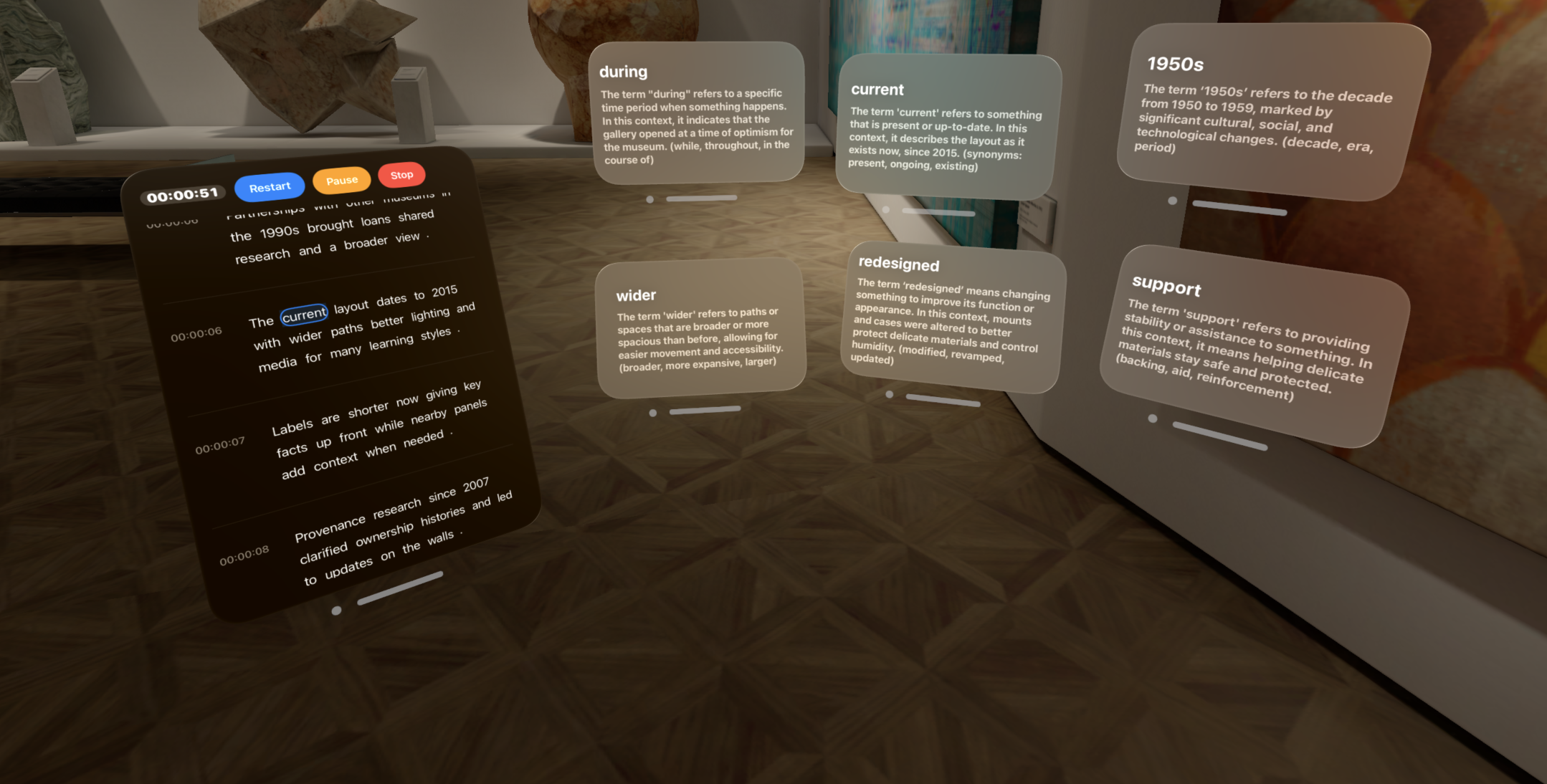
In today's digital world, transcripts turn speech into plain text, but they often feel dense, linear, and difficult to use. Debrieviate reimagines transcripts on visionOS as interactive, visual experiences — breaking them into tappable words and digestible segments. Through a blend of coding and UX design, the project empowers users to actively navigate, decode jargon, and engage with transcripts rather than passively read them.
02 — RESEARCH
BEHIND THE PROBLEM & PERSONA
To understand the challenges of using transcripts, we conducted quick interviews with students and professionals who frequently work with recorded content, and reviewed common transcript platforms. Affinity diagramming surfaced patterns in how people experience transcripts; a five-stage current-state journey map showed how listeners prepare, follow along, hit jargon, lose flow, and struggle to re-engage.
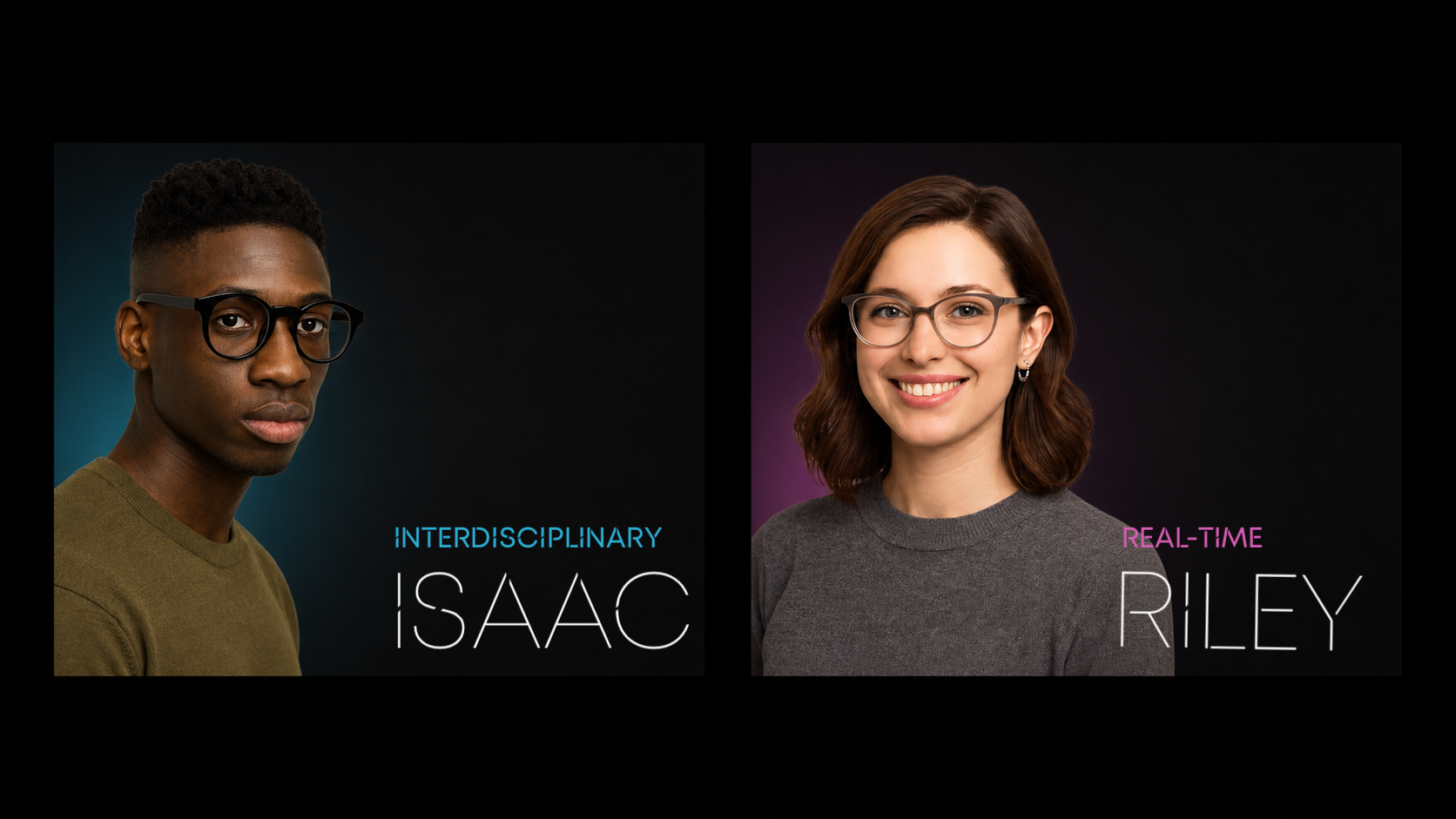
Interdisciplinary Isaac represents people working across disciplines, where acronyms and terminology may change meaning between professional fields. Realtime Riley represents researchers, journalists, and cultural workers who need to understand how language is being used in a specific situation—not merely its dictionary definition in real time.
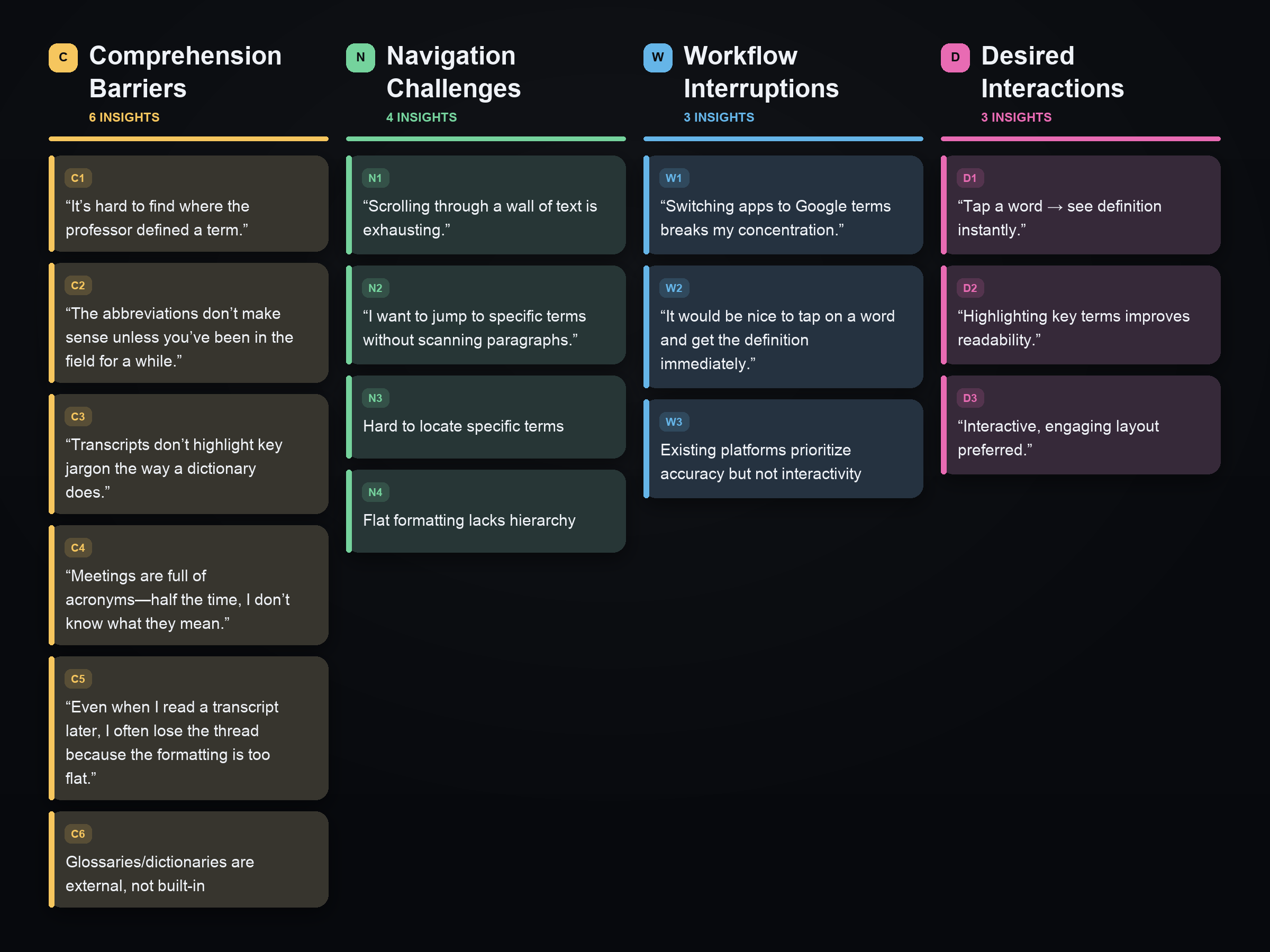
We used affinity diagramming to synthesize qualitative findings from rapid interviews, observations of transcript use, and a review of existing platforms. By clustering observations into sticky-note-style groups, we identified recurring patterns in how people comprehend, navigate, and interact with transcripts.
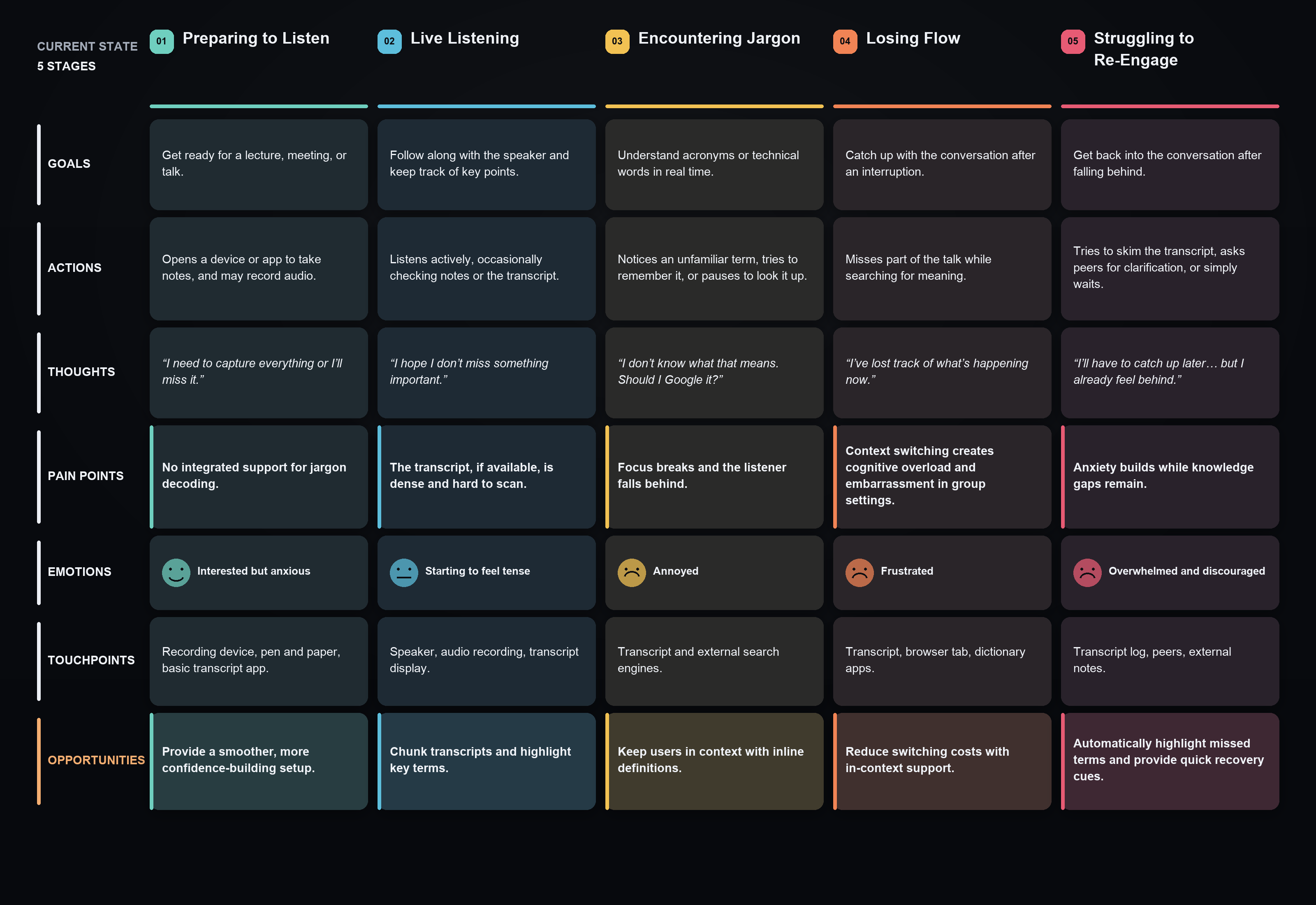
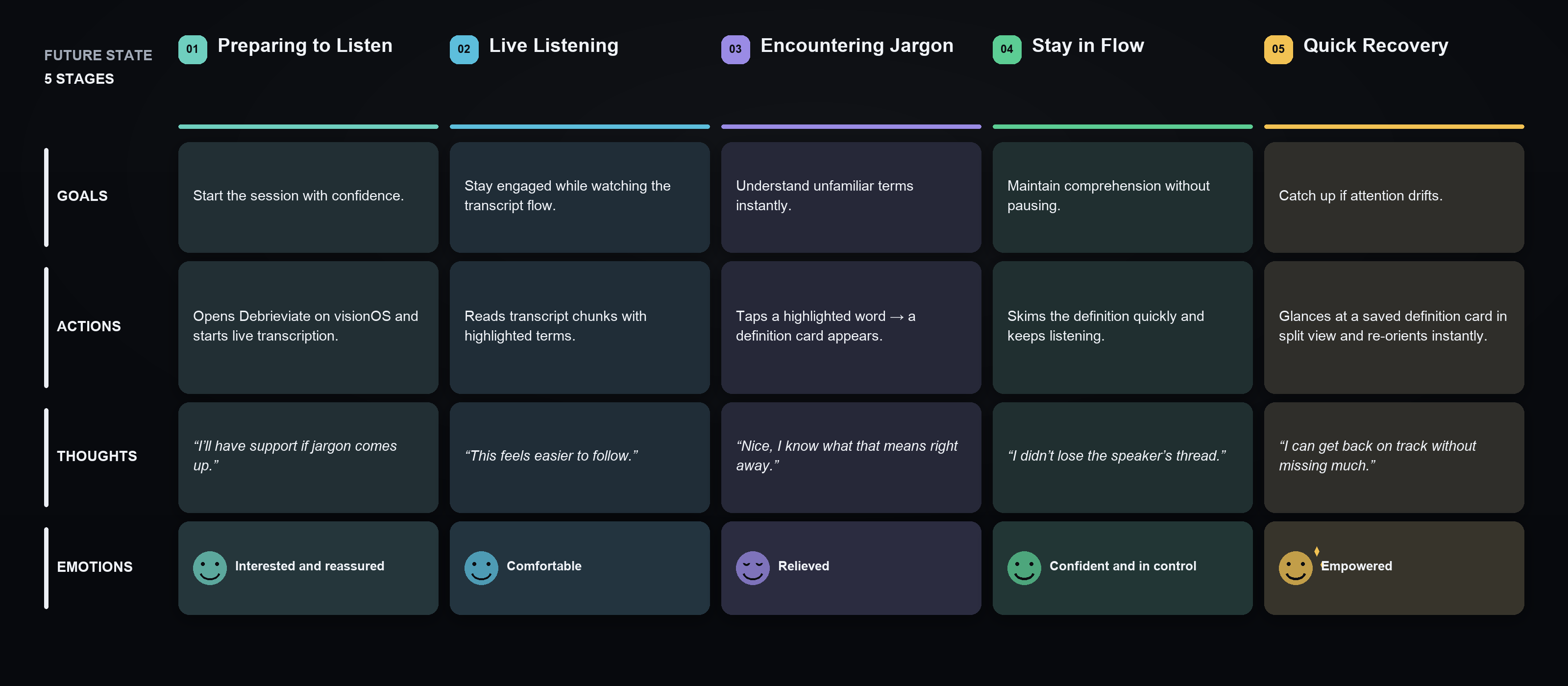
Building on the pain points identified through our personas and affinity diagramming, we found that the greatest breakdown occurs when listeners encounter unfamiliar jargon during live conversations. We mapped a five-stage current-state journey to show how people prepare, follow the discussion, encounter jargon, lose conversational flow, and ultimately struggle to re-engage.
03 — IDEATION
FROM PAIN POINTS TO POSSIBILITIES
Having mapped the pain points, we ideated spatial treatments that break transcripts into tappable words and digestible segments — decoding jargon in context, in place, without losing the thread of the conversation.
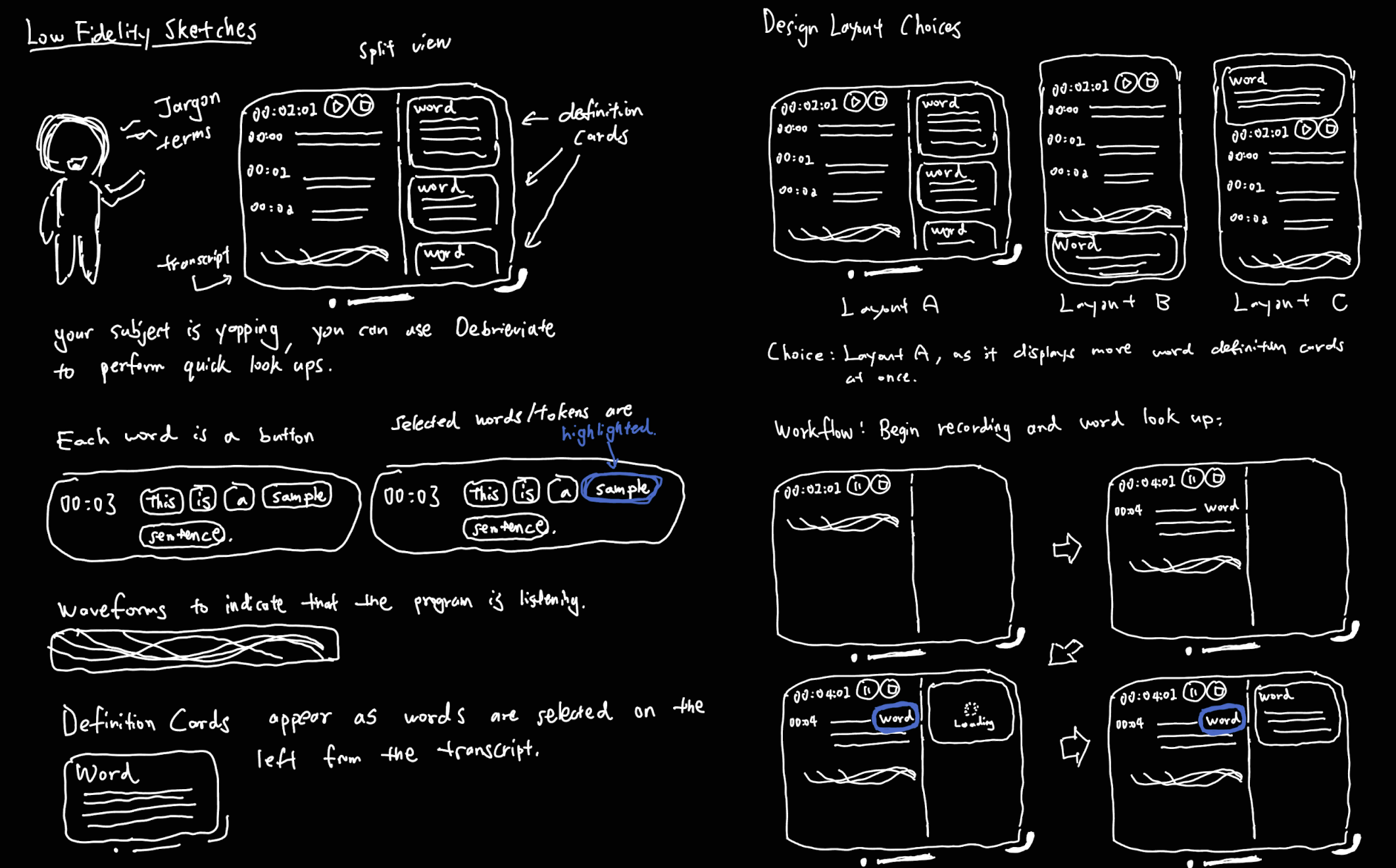
To bring this envisioned experience to life, we translated the journey into low-fidelity sketches, exploring how transcripts and definition cards could coexist within a simple, intuitive interface.
04 — PROTOTYPE
HIGH-FIDELITY PROTOTYPE
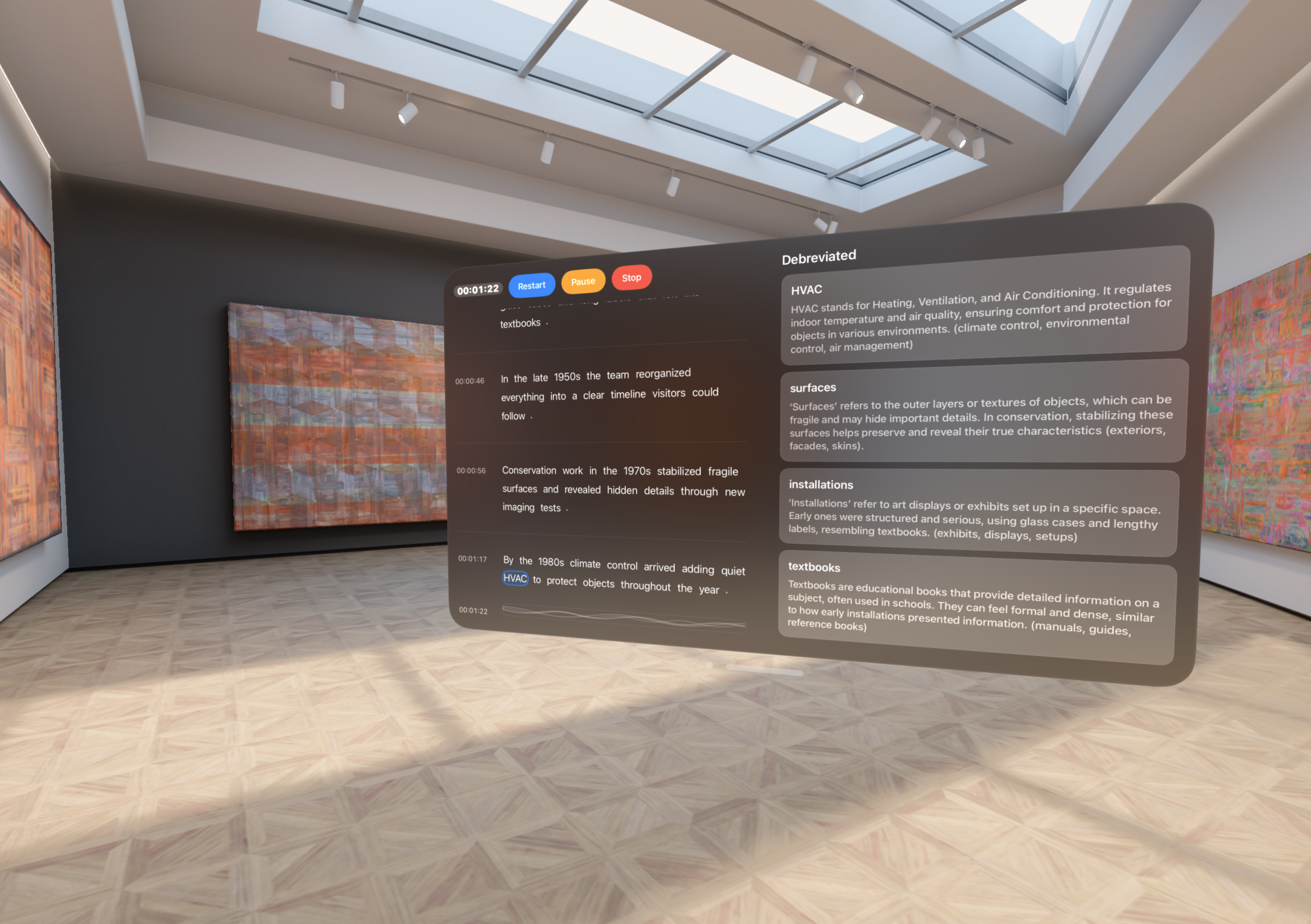
Using Swift and Xcode, I developed a fully functional visionOS application that brings the design concept to life.
PROTOTYPE DEMO
05 — Iterative Design
User Feedback
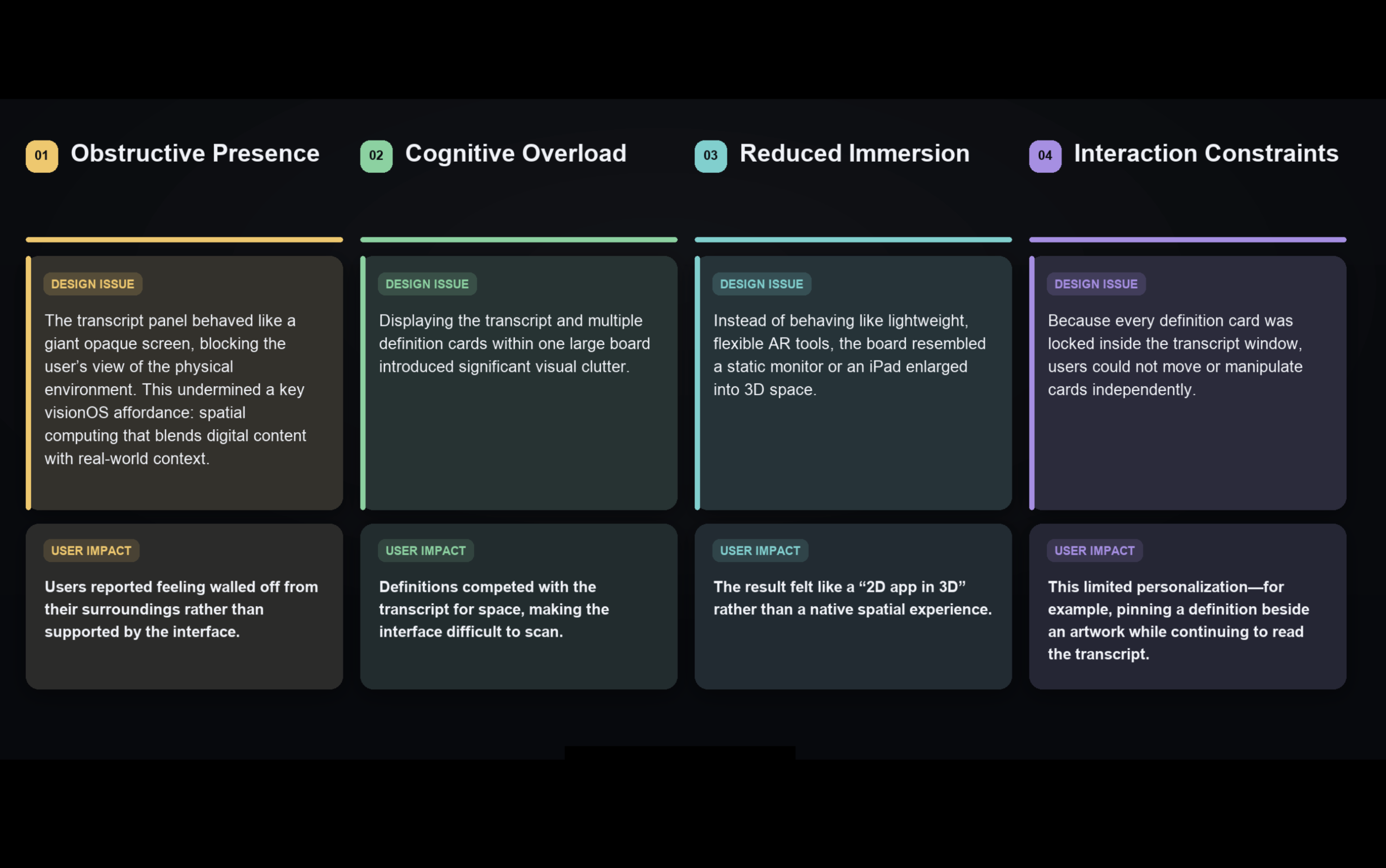
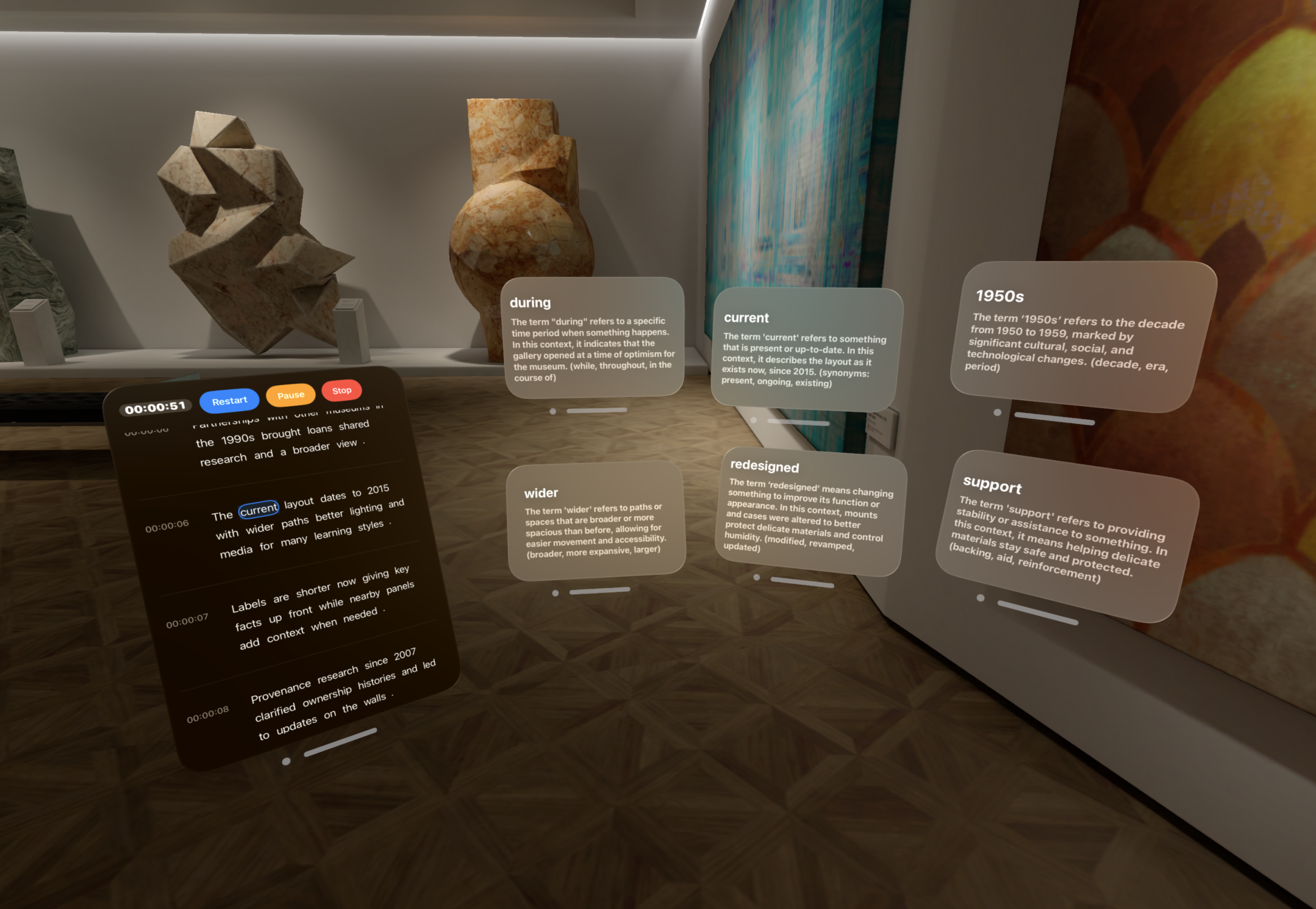
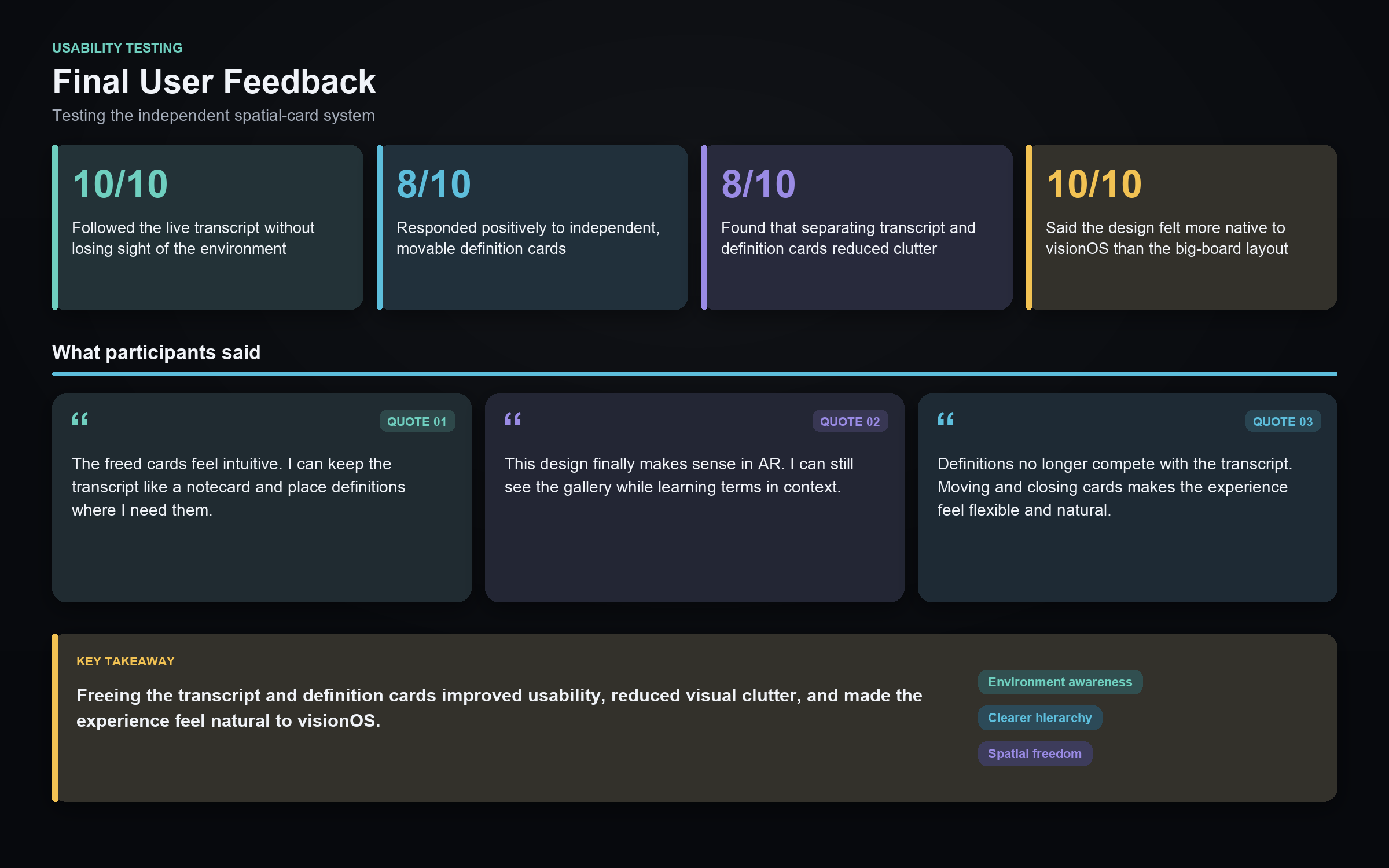
The initial design was functional, but it did not fully leverage the spatial affordances of visionOS. Combining the transcript and definition cards within one oversized board obstructed the user’s surroundings, increased cognitive load, and constrained interaction. This feedback directly informed my pivot toward a flexible system of independent spatial cards. By allowing users to move, pin, and close cards individually, the redesigned experience better supports immersion, personalization, and natural AR interaction.
The Final Design
After incorporating user feedback and iterating through multiple design refinements, I developed the final concept: a flexible system of independent spatial cards designed specifically for the visionOS experience.
THE FINAL DESIGN - DEMO VIDEO
FINAL USER FEEDBACK
06 — Engineering & Architecture
Under the Hood
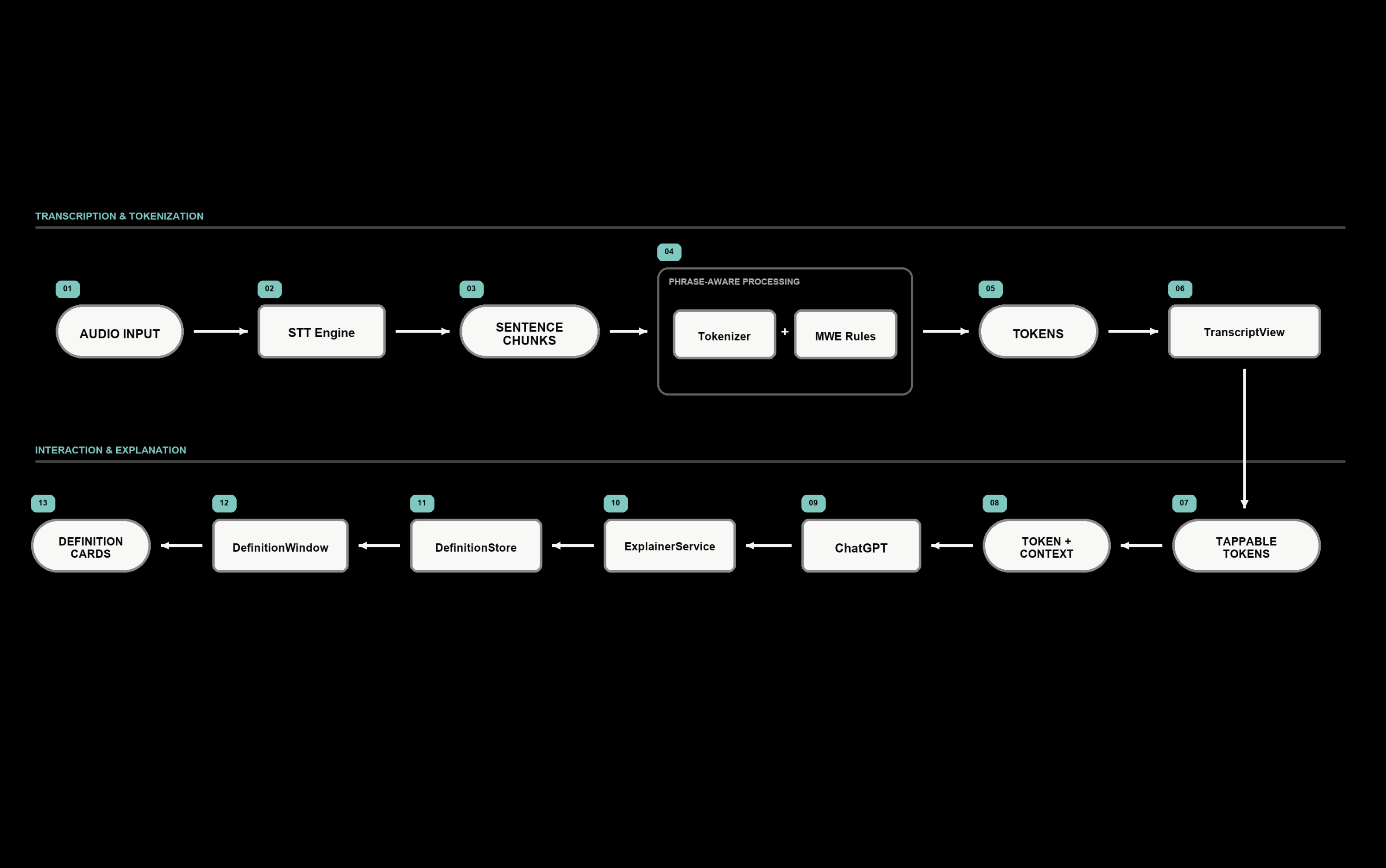
Debrieviate integrates live transcription, phrase-aware grouping, contextual explanation, and spatial interaction into one cohesive system. Audio is converted into time-coded transcript chunks, while related words are dynamically grouped into natural, tappable phrase units. When a user selects a term, the system combines it with its surrounding context, retrieves a cached result or queries ChatGPT, and presents the explanation as an independent spatial definition card. By separating transcription, state management, explanation services, and spatial windows into modular components, the architecture avoids the scalability problems of a fixed Superword vocabulary while keeping the application maintainable, testable, and extensible.
DATA FLOW
Debrieviate captures audio through its speech-to-text engine and converts it into time-coded transcript chunks. Each chunk first passes through word-level tokenization, followed by a phrase-aware grouping layer that can combine related words into meaningful, tappable units. When a user taps a word or phrase, the app sends the selected text together with its surrounding sentence context to ExplainerService. The service first checks for a cached definition. If no cached result is available, it queries ChatGPT for a short, plain-language explanation. The returned definition is stored in DefinitionStore and displayed as an independent spatial definition card. This allows users to understand unfamiliar terminology without leaving the transcript or interrupting the conversation.
Modular Architecture
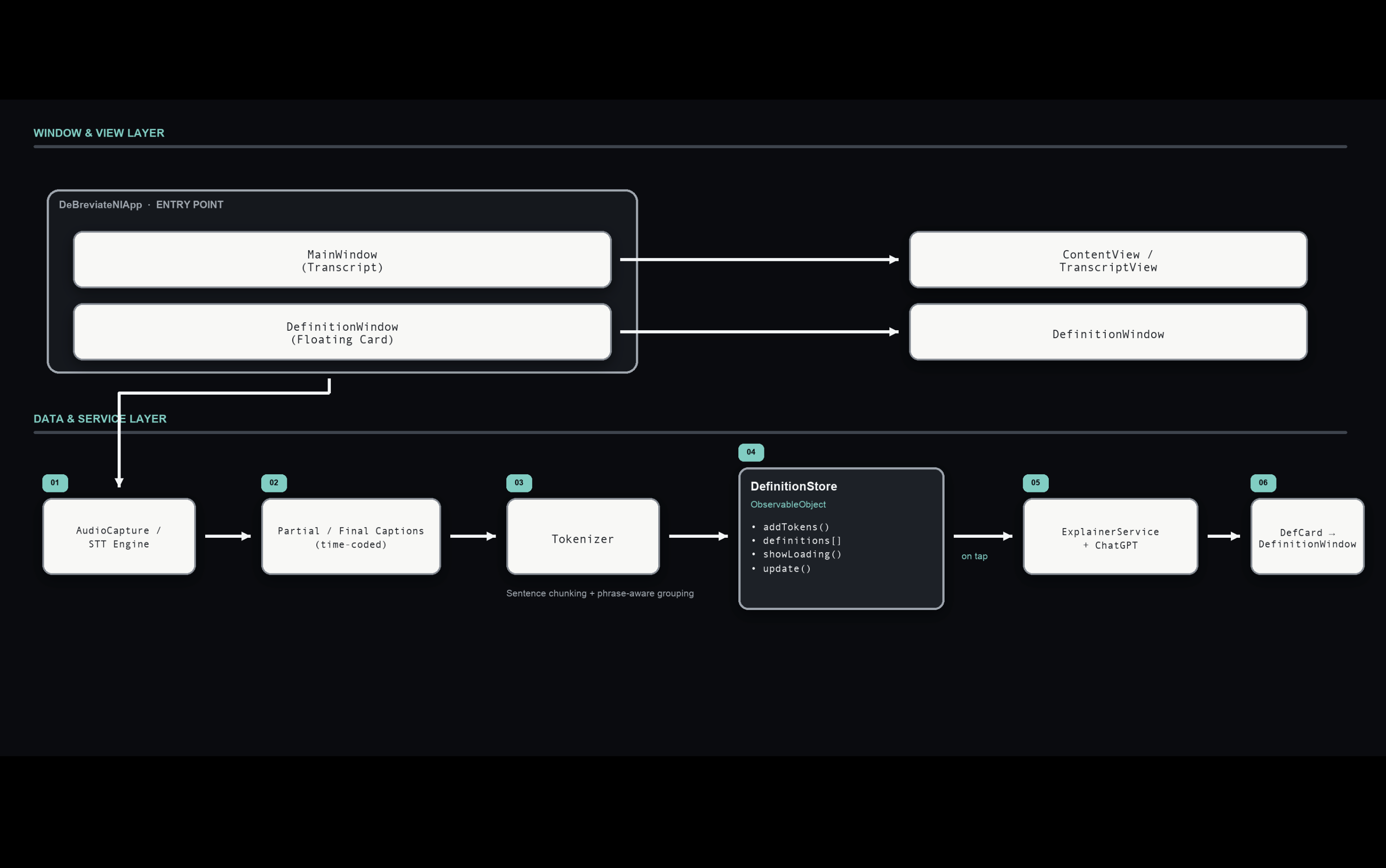
Debrieviate follows a modular architecture that separates interface, application state, language processing, and external lookup responsibilities. The DeBreviateNIApp entry point manages the main transcript window and one or more floating DefinitionWindow instances. Interactions inside ContentView and TranscriptView create lookup requests, while DefinitionWindow presents the returned explanations. DefinitionStore, implemented as an ObservableObject, centrally manages definitions, loading states, caching, and interface updates. ExplainerService handles contextual definition requests and communication with ChatGPT. This separation of concerns makes the application easier to maintain, test, and extend with future features such as multilingual definitions, domain-specific glossaries, or alternative explanation services.
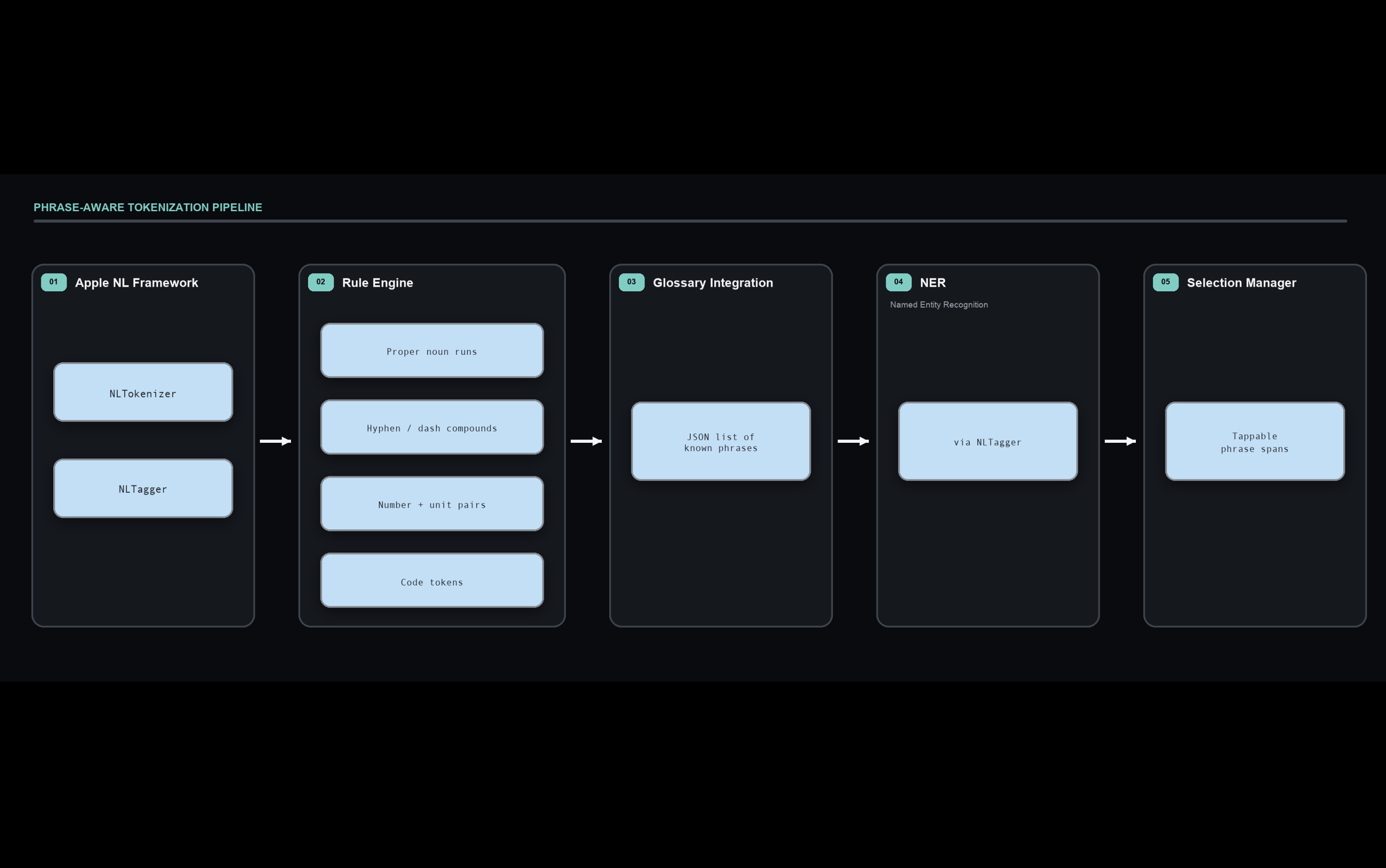
Phrase-Aware Tokenization
To make transcript interaction feel natural, Debrieviate uses a hybrid phrase-aware tokenization pipeline rather than simple whitespace splitting. The system begins with word-level tokenization and then dynamically promotes selected spans into multi-word expressions. Phrase candidates are identified through a combination of: Apple NLTokenizer and NLTagger, Named-entity recognition for people, places, and organizations, Proper-noun sequences, Hyphenated and dashed compounds, Number-and-unit combinations, Code-like tokens, A small curated glossary of known phrases. If no phrase pattern is detected, the interface simply falls back to individual word tokens.
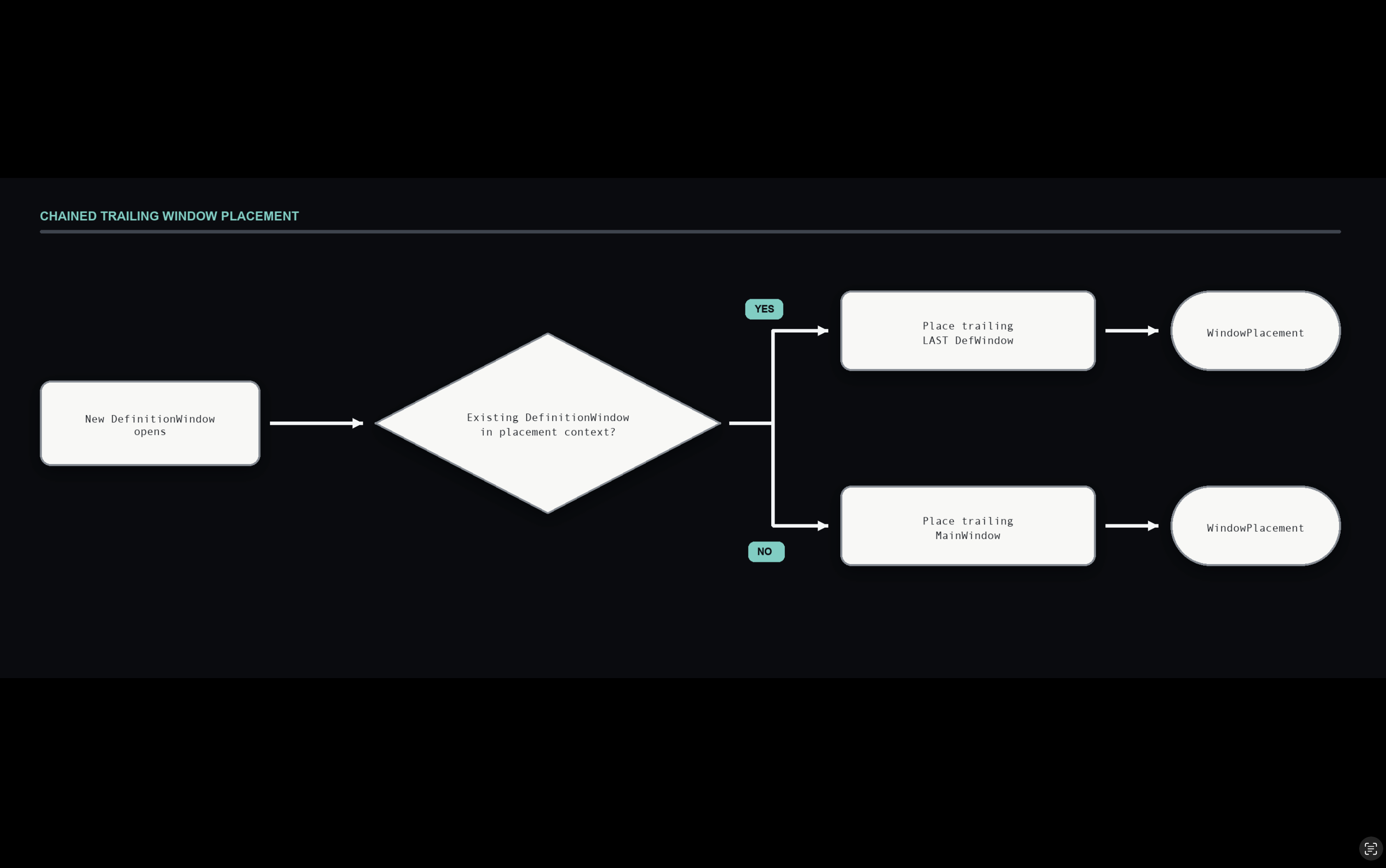
Window Placement Algorithm: Chained Trailing
We designed a chained trailing algorithm to control how new definition windows appear in visionOS. Rather than overlapping the transcript or stacking multiple cards in the same location, the first definition window is anchored beside the main transcript, while each subsequent window is positioned next to the most recently opened card. This creates an orderly sequence that expands outward as users explore additional terms. This approach makes the experience more user-friendly by: Preventing visual clutter and window overlap, establishing a clear spatial relationship between related definitions, allowing users to follow their exploration without losing the main transcript, mirroring the natural way people expand thoughts and annotations outward from a central idea.
07 — Conclusion
Conclusion & Reflection
This project began with a simple observation: transcripts are functional, but they can be difficult to navigate—especially when conversations are dense with jargon and abbreviations. Through affinity diagramming, persona development, and user journey mapping, we identified three central challenges: information overload, disrupted flow during external lookups, and interfaces that felt more like enlarged 2D screens than native spatial experiences. We translated these insights into sketches, wireframes, and a modular system architecture, ultimately building a functional visionOS prototype. The app streams speech-to-text content, organizes transcripts into tappable words and phrase-aware groups, and uses ChatGPT as an explainer service to generate concise, contextual definitions. The design evolved through several iterations. An early version placed the transcript and definitions on a single large board, which obstructed the environment and created unnecessary visual competition. In the final design, the transcript behaves like a lightweight spatial card, while definition cards can be positioned, moved, pinned, or closed independently. User testing validated this direction. Participants found the final experience less cluttered, easier to follow, and more natural within the visionOS spatial environment. Engineering decisions—including modular services, definition caching, phrase-aware grouping, and chained window placement—also made the system more maintainable and extensible. Ultimately, Debrieviate demonstrates how contextual language support can become part of a live spatial experience without pulling users away from the conversation or the environment around them.
08 — LOOKING FORWARD
LOOKING FORWARD
Future versions of Debrieviate could: Provide richer educational explanations with examples, images, and diagrams. Add multilingual definitions and translation for greater accessibility. Support domain-specific glossaries for fields such as medicine, law, technology, and the arts. Allow users to save, organize, and revisit definitions after a session. Enable collaborative sharing of annotations and glossaries in shared spatial environments.